Showing posts with label play. Show all posts

Tuesday, June 28, 2016

Play Framework 2.5 and Vue sample CRUD single page application

In my previous post I shared a link to a sample application I had built using the Play framework. That application works and is fine but the one thing I wanted to change was to have a Javascript template framework on the front-end so that I can easily update portions of the webpage with AJAX request and response calls to and from the server. There are many different approaches to accomplish this; you can do it all with Javascript but there are frameworks and libraries available that make this sort of thing a lot easier and cleaner to do. I have used Javascript template engines like Handlebars or DustJs in the past and they have worked quite nicely. There are even more modern frameworks available now that go the extra mile and make things even simpler and more powerful. AngularJS comes to mind. I spent some time learning and seeing how I can use AngularJS for my Play application but in the end I opted to use Vue.js instead. Vue was a lot easier to learn and to get up and running with than AngularJS was and it works amazingly well.

I started by creating a default Play application and reused most of the business-side logic I had used in the previous version of the app. I then created a folder in the root of my project called 'vue' and I put all my Vue related files in there. I am using Play as a RESTful service and Vue as a client-side rendering framework. The only Play Scala template I have is the index.scala.html page which references the bundled javascript file and defines the root element for the Vue application. The only reason I have this index file within Play is to do with the Javascript routing provided by Play. Having said that I think in the long run I will move the index file into the Vue project in order to make use of Vue's hot-reload feature.

If you are interested in this sample application I have built you can clone / downloaded it from here.

Introduction

This application is used to showcase the Play framework as well as Vue.js while learning basic Spanish phrases. This application makes use of the following:

Installing

Running

  • Open a command terminal and change into the sample application root directory
  • Run activator:
    • activator run
  • Run webpack: 
    • webpack --watch
  • Open the following link in a browser:
    • http://localhost:9000

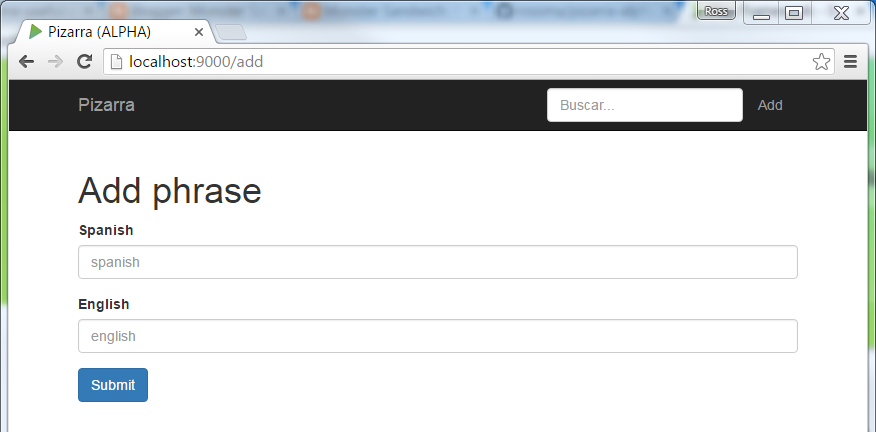
Screenshots


Monday, June 27, 2016

Play Framework 2.5 sample CRUD application

I have had an interest in the Play framework for a number of year now and I have built a few small applications using the framework. The Play framework has evolved over time and in order to keep up to date with the most recent changes it's useful to try and build your own application. I have built a very simple CRUD application for this purpose.

If you are interested in application you can clone / downloaded it from here.

Introduction

This application is used to showcase Play framework while learning basic Spanish phrases. This application makes use of the following:

Installing

Running

  • Open a command terminal and change into the sample application root directory
  • Run activator:
    • activator run

Screenshots


Thursday, December 12, 2013

Building Reactive Apps - Presentation by James Ward

I watched the "Optimizing Play for Production" webinar yesterday and was hugely impressed and encouraged by what Play is capable of. I would recommend this presentation to anyone building web applications with the Play Framework or just curious as to why Play is such an awesome framework to use.

Typesafe are really embracing the community by offering free courses through Coursera and free live webinars like the one mentioned above. A great way for someone like me to learn from the experts.


Thursday, November 21, 2013

Play 2 + Scala + Slick + more sample application

In my attempts to learn the Play Framework I decided to build my own sandbox project called Resource Vault. If you are curious about what I did you can download the project and run it in your local environment.

Resource Vault core design choices 


  • Play for Scala - Scala API for Play application developers
  • Slick - Modern database query and access library for Scala
  • Bootstrap - Mobile first front-end framework for faster and easier web development. Includes 200 glyphs in font format from the Glyphicon Halflings set
  • Webjars - WebJars are client-side web libraries (e.g. jQuery & Bootstrap) packaged into JAR files
  • Specs2 - Library for writing Acceptance and Unit tests


Resource Vault application overview

Resource Vault is a virtual vault for referencing resources, a central location to bookmark important links and resources. A user can add any number of resources and group them accordingly using basic CRUD actions. Below is a screen shot of what the home page looks like:


Running the application

In order to get Resource Vault running in your local environment you can try the following steps:


I won’t go into any other detail describing every file so if you want to dig deeper please have a look at the code.

I am going to continue building adding to this project so that I can grow and improve my knowledge of Play and Scala and all the rest that comes with it. I will look at adding more useful unit specifications and acceptance specifications with Specs2 as well as FluentLenium. I want to add authentication and authorisation and then deploy and run the application on Heroku. I have a number of other use cases in mind and hopefully I can get time to cover most of them.

Please feel free to comment and give suggestions on areas where you think I could have done things in a different way.


Wednesday, May 8, 2013

Learning Play! Framework 2

I was sent a copy of the recently published book "Learning Play! Framework 2" from Packt Publishing. For the past couple of months I have been planning on experimenting with Play 2 and on building my own web application with this awesome framework but I have just been so busy with work that I haven't had the time or the energy to do anything about it. Now that I have this additional resource to help me get going I have even more motivation to spend time building this app of mine using Play!.


Thursday, September 8, 2011

Play Framework Cookbook


In my opinion the Play Framework is the most exciting framework to develop web applications using Java. I recently received a copy of the Play Framework Cookbook by Packt Publications I am looking forward in working my way through it.

I think Play's online documentation is pretty good although it probably is not as comprehensive as one would like it to be. It is this reason why I am very glad to see that another book as been published about the Play Framework.


Sunday, January 17, 2010

Shopping Cart Web Application - Play Framework

 Shopping Cart Application – Play Framework

I recently spent time stepping through the yabe (yet another blog engine) tutorial for the Play Framework.

"The Play framework makes it easier to build Web applications with Java"


What is Play?
Play is a full stack open source web framework for Java that focuses on developer productivity.

"The Play framework compiles your Java sources directly and hot-reloads them into the JVM without the need to restart the server. You can then edit, reload and see your modifications immediately"


Why Play?
There are a number of reasons why the Play framework is cool and I highly recommend you take a look at it: 5 cool things you can do with Play. The one that caught my eye was that the Play framework eliminates the time spent in compiling Java source files, packaging the code into an archive and then deploying that archive to a server. Already I am hooked. This is great! For something similar to this for JEE development take a look at JRebel. Depending on which license you get you may have to pay a fee.

Shopping Cart
In an effort to learn more I decided to build my own Play web application based on the very basic Shopping Cart application I have used in the past.

Here are a few comparisons between the original Shopping Cart web application and this one written for the Play framework:

1. JPA
The Play framework supports JPA so there really isn’t any difference with the entity classes in the domain model.

2. Spring
In the original application I was mainly using Spring for dependency injection. I didn’t need to use Spring in my application but the Play framework supports Spring as well as dependency injection (in version 1.0.1).

3. JSF Components vs HTML
The original application used JSF to build the GUI interface whereas Play uses plain HTML. There are many different JSF components to choose from and you can use additional JSF component libraries besides the standard components that come with JSF such as RichFaces / ICEfaces and many more. With very little effort you can include a JSF component within your page and bind it to a Java class. It is all very cool for a Java developer who wants a nice looking website without hiring a web developer to do it for them. However there are a few drawbacks to this approach, some of the main ones being:

  • The JSF components render down to HTML and JavaScript. You have no real control over how the rendering takes place. You could be rendering a HTML table whereas you would prefer to use a DIV.
  • Some JSF components reference custom JavaScript files. These JavaScript files could be quite large and you may not even be referencing them but because they form part of the JSF library you automatically reference it. 
  • Not that easy to change the behaviour of the JSF components to do something that it was never designed to do.

The Play framework uses standard HTML as well as its own template engine. The drawbacks for a Java developer is there are no drag and dropping of components into a JSP page. However if you’re a web developer you would most likely prefer to work with plain HTML files. You have more control over your page and there are 100’s of CSS / JavaScript libraries you can pull into your project without much hassle.

4. AJAX
The original project used a very cool JSF library called RichFaces. RichFaces has many ‘rich’ components to choose from with built in Ajax support.

I used JQuery to do all the Ajax requests and responses in the Play framework. JQuery is a very powerful JavaScript library. However you are not forced to use it, you could just as easily do it with your own JavaScript or another library that offers similar functionality.

5. JUnit
Both the original application and Play use JUnit as the test framework. The Play framework has a couple of nice utilities you can use and comes with a test suite out of the box to run all your tests from.

That’s all I wanted to say on that, the Play documentation is quite good, for a taste of what you can do I highly recommend the yabe tutorial and they have an active forum for any questions.